Adding a video to listing on Wheelbase
- Go to your vehicle's listing on Wheelbase
- Go to the photos tab
- Click Add video at the top
- Here it will prompt you to enter a Youtube link. You need to make sure your video is uploaded to Youtube and make sure it is viewable when logged out.
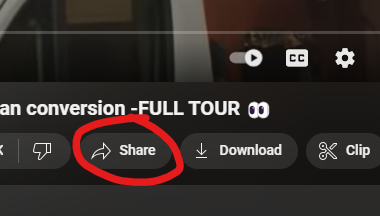
- On the Youtube video bottom right click share:
- Copy the link that's generated:
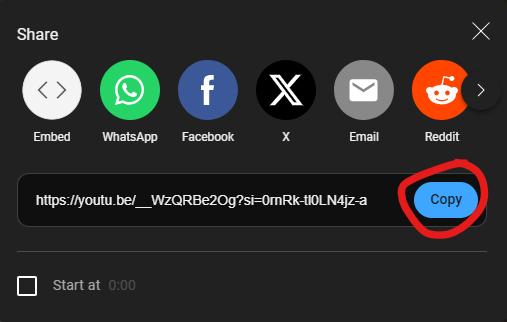
- Paste this link into Wheelbase.
- Save Changes
Related Articles
Discount preferences, codes and campervan types in Wheelbase
There are 4 iterations of how a campervan can be opted into discounts: "Converted Van" - Opted out of all discounts "Camper van" - Seasonal discounts AND Long Term discounts "Motorhome" - Seasonal discounts ONLY "Converted van (+ adding their ...
PCO Video Links
My First Booking - What to expect from your first Quirky customer What Makes the Perfect Quirky Campervan Thinking About Renting? - Quirky Rental Checklist
Wheelbase privacy/GDPR - Owners can see bookings history and details of other customers
Couple of responses: 1. This is something we discussed with Wheelbase when they were setting up the functionality, and it is intended to work in this way. I appreciate it might not seem intuitive but there are circumstances where this is very useful ...
Wheelbase - Payload Warning text
<b>Warning:</b> The payload of this vehicle is 325kg. This is below the Quirky Campers recommended payload of 460kg for a vehicle with 4 belted seats. Drivers need to be aware that the total weight of the driver, passengers and baggage must be below ...
Blocking off dates on Wheelbase Calendars
If you need to block off dates on your calendar for times when the van is unavailable to take bookings: Go to your van page and click the availability tab on the top bar: Under where it says Adjust Availability you can input the dates your van is ...